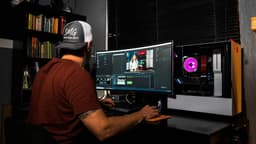
Video Editing
Edit video content for creators, brands, or businesses.
About Video Editing
Video content has exploded across YouTube, TikTok, Instagram, and corporate marketing. Creators and businesses need skilled editors who can transform raw footage into polished, engaging content. If you can cut compelling stories, add graphics and effects, and match a client's vision and style, you can build a thriving freelance career.
For digital nomads, video editing is ideal laptop work. Files transfer via cloud storage, feedback happens asynchronously, and final videos deliver digitally. You never need to be in the same room—or even the same continent—as your clients. A powerful laptop is your only significant requirement, and modern machines handle professional editing software anywhere.
Income Expectations
Video editing rates vary significantly by content type and experience:
| Content Type | Beginner Rate | Experienced Rate |
|---|---|---|
| YouTube long-form (10-20 min) | $50-100 | $150-400+ |
| YouTube shorts/TikTok | $25-50 | $75-150 |
| Podcast video version | $50-100 | $100-250 |
| Corporate/promotional | $100-250 | $300-1,000+ |
| Social media package (5-10 clips) | $100-200 | $300-600 |
Monthly income examples:
- 15 YouTube videos/month at $100 each = $1,500/month
- 20 videos/month at $200 each = $4,000/month
- Mix of content types and clients = variable
Most successful freelance editors work with 3-5 regular clients, supplemented by one-off projects.
Equipment Investment
Video editing requires serious computing power:
Laptop requirements:
- CPU: Intel i7/i9 or AMD Ryzen 7/9
- RAM: 16GB minimum, 32GB recommended
- GPU: Dedicated graphics (RTX 3060 or better)
- Storage: 1TB+ NVMe SSD, external drives for archives
- Display: Color-accurate screen
Budget: $1,500-3,000 for a capable editing laptop. This is your main business investment.
Popular laptops for editing:
- MacBook Pro 14"/16" (excellent but expensive)
- ASUS ProArt StudioBook
- Dell XPS 15/17
- Razer Blade 15
Software options:
| Software | Cost | Best For |
|---|---|---|
| DaVinci Resolve | Free (paid version $295) | Color grading, full workflow |
| Adobe Premiere Pro | $23/month | Industry standard, After Effects integration |
| Final Cut Pro | $300 one-time | Mac users, efficient workflow |
| CapCut | Free | Quick social content |
Start with DaVinci Resolve (free) while learning. It's professional-grade and costs nothing.
Finding Clients
YouTube creators: The most accessible market. Many creators:
- Post regularly but can't edit themselves
- Want to focus on filming, not post-production
- Have some budget but can't afford top-tier rates
- Need consistent style maintenance
Find them by: watching content in niches you enjoy, identifying creators whose editing could improve, reaching out with specific suggestions.
Platforms for finding work:
- Upwork: Competitive but steady work available
- Fiverr: Good for building portfolio and reviews
- Direct outreach: Best rates but requires sales skills
- Creator communities: Discord servers, Reddit communities
Building relationships: Most editors work with regular clients rather than constant one-offs. One creator posting weekly = 4 videos/month from a single relationship. Build these recurring relationships.
Specialization Options
Specialists command higher rates:
By platform: YouTube long-form, shorts/TikTok, Instagram Reels, corporate video By niche: Gaming, education, vlogs, tutorials, podcast video By skill: Motion graphics, color grading, sound design, thumbnail design By style: Fast-paced entertainment, documentary, corporate polish
Example: "YouTube gaming editor specializing in highlight compilations" is more valuable than "video editor."
The Editing Workflow
Typical project flow:
- Receive footage: Client uploads raw files to cloud storage
- Review brief: Understand goals, style, deadlines
- Rough cut: Basic assembly of content
- Client feedback: Usually 1-2 revision rounds
- Final cut: Polish, color, audio, graphics
- Delivery: Export and upload final files
Communication is key. Misunderstandings waste time. Use Notion to track projects, deadlines, and client preferences. Store project files and assets in Google Drive or Dropbox.
Working While Traveling
Video editing works well for nomads with caveats:
Challenges:
- Large file downloads/uploads need decent internet
- Editing software drains laptop battery
- Finding quiet spaces for reviewing audio
- Carrying a heavy, expensive laptop
Solutions:
- Download files overnight on fast connections
- Work from accommodations with reliable power
- Use Frame.io or similar for efficient client review
- Get good travel insurance for equipment
Many editors travel slowly, spending weeks in locations with good internet rather than constant movement.
Building Your Portfolio
Clients need to see your work before hiring:
Quick portfolio builders:
- Re-edit existing YouTube videos in your style
- Create spec work (fictional brand videos)
- Offer discounted work to small creators for portfolio pieces
- Edit content for friends or local businesses
What to show:
- Before/after comparisons
- Range of styles and content types
- Specific skills (motion graphics, color grading)
- Consistent quality
Is This Right for You?
Consider video editing if you:
- Have or can invest in powerful laptop ($1,500-3,000)
- Enjoy creative problem-solving
- Can handle deadline pressure
- Want ongoing client relationships
- Appreciate visual storytelling
Consider alternatives if you:
- Can't invest in equipment
- Have unreliable internet while traveling
- Don't enjoy revision cycles and client feedback
- Prefer completely asynchronous work
Related paths: Podcast production uses similar skills with audio focus. Videography combines shooting with editing. YouTube channel lets you create your own content.
Getting started: Master editing software like Premiere Pro, Final Cut, or DaVinci Resolve. Build a portfolio by editing your own content or offering discounted work to build samples. Study successful content in niches you want to serve. Find clients through freelance platforms, creator communities, or direct outreach. Specialize in specific content types (YouTube long-form, short-form social, podcasts) to develop expertise and attract relevant clients.
Business Models
Frequently Asked Questions
How much do freelance video editors charge?
Rates vary by experience and content type. Beginners charge $25-50/hour or $50-150 per short video. Experienced editors charge $50-100/hour or $200-500+ per video. YouTube editors often charge $50-200 per video depending on length and complexity.
What software do I need for video editing?
Industry standards: Adobe Premiere Pro ($23/month), Final Cut Pro ($300 one-time, Mac only), DaVinci Resolve (free version available). For simpler content: CapCut (free), iMovie (free, Mac). Start with free options while learning, upgrade as you get paid work.
What computer specs do I need for video editing?
Minimum: 16GB RAM, dedicated GPU, fast SSD storage. Ideal: 32GB+ RAM, powerful GPU (RTX 3060+), NVMe SSD. For 4K editing, you need better specs. Budget $1,500-3,000 for a capable editing laptop.
How do I find my first video editing clients?
Start with YouTubers in niches you enjoy—many need editors but can't afford premium rates. Offer discounted work to build portfolio. Post on Upwork and Fiverr. Join creator communities and offer services. Cold outreach to creators whose content you could improve.
Difficulty Level
Somewhat Difficult 😕
Level of Passivity
Fully Active
How to Monetize
- Paid Per Hour
- Paid Per Project