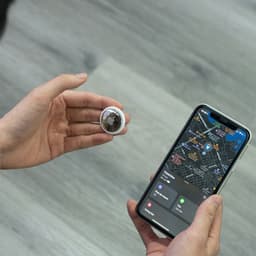
Apple AirTags
Tiny Bluetooth trackers that help you locate luggage, wallets, and gear anywhere in the world using Apple's Find My network.
What are Apple AirTags?
Apple AirTags are small Bluetooth trackers that help you locate your belongings using the Find My network. About the size of a coin, they can be attached to luggage, slipped into wallets, or clipped onto keys.
For digital nomads, AirTags solve a persistent anxiety: losing your stuff in unfamiliar places. Whether your checked bag goes missing in transit or you leave your backpack at a cafe, AirTags help you find it.
Why Digital Nomads Use AirTags
Track Checked Luggage
Airlines lose or delay millions of bags every year. With an AirTag in your checked luggage, you know exactly where your bag is at all times. Watch it move through the airport system. See when it arrives at baggage claim. If it ends up in the wrong city, you have proof of its location.
Find Lost Items Abroad
Losing your wallet or keys is stressful at home. Losing them in a foreign country where you do not speak the language is worse. AirTags let you retrace your steps and locate items without relying on strangers or local authorities.
Peace of Mind for Valuable Gear
Traveling with expensive equipment like cameras, laptops, or musical instruments? An AirTag provides an extra layer of security. If someone walks off with your bag, you can track where it goes.
How AirTags Work
The Find My Network
AirTags do not have GPS or cellular radios. Instead, they use Bluetooth to communicate with nearby Apple devices. When any iPhone, iPad, or Mac detects your AirTag, it anonymously relays the location to you through iCloud.
With over a billion Apple devices in use, this network is remarkably effective, especially in populated areas like airports, train stations, and cities.
Precision Finding
If you have an iPhone 11 or newer with Ultra Wideband, Precision Finding guides you directly to your AirTag. Your phone displays an arrow and distance measurement, helping you locate items even when they are buried in a drawer or hidden under a seat.
Sound Alerts
You can make your AirTag play a sound through the Find My app, helpful when the item is nearby but out of sight. The sound is loud enough to hear from another room.
Setting Up AirTags for Travel
Step 1: Pair with iPhone
Hold the AirTag near your iPhone and follow the setup prompts. Name each AirTag descriptively: "Black Backpack," "Carry-On Suitcase," "Passport Wallet."
Step 2: Attach to Items
AirTags do not have a built-in attachment point. Options include:
- AirTag holders: Keychain loops, luggage tags, and wallet inserts
- Direct placement: Drop into bag pockets or luggage compartments
- Adhesive mounts: Stick to laptops, camera bags, or cases
Step 3: Test Before Travel
Before your trip, practice using Find My to locate your AirTags around your home. Familiarize yourself with Precision Finding so you can use it quickly when needed.
AirTag Placement Tips
| Item | Placement Recommendation |
|---|---|
| Checked luggage | Inside main compartment, not in pockets |
| Carry-on bag | Front pocket for easy access |
| Wallet | Get an AirTag-compatible wallet insert |
| Laptop bag | Inside padded laptop sleeve |
| Camera gear | Inside case, away from lenses |
AirTags vs. Alternatives
| Feature | AirTags | Tile Pro | Samsung SmartTag+ |
|---|---|---|---|
| Price | $29 | $35 | $40 |
| Network Size | 1B+ devices | Smaller | Galaxy devices |
| Precision Finding | Yes (UWB) | No | Yes (UWB) |
| Battery | Replaceable | Replaceable | Replaceable |
| Best For | iPhone users | Cross-platform | Samsung users |
Privacy and Safety Features
Apple built in anti-stalking protections:
- Unknown AirTag alerts: Your iPhone notifies you if an unfamiliar AirTag is traveling with you
- Sound after separation: AirTags separated from their owner for extended periods play a sound
- Android detection: Android users can download an app to scan for nearby AirTags
These features address legitimate concerns while maintaining utility for travelers.
Limitations to Know
Indoor accuracy varies. In areas with fewer Apple devices, location updates may be delayed or less precise.
No real-time tracking. AirTags update location when detected by passing devices, not continuously. In remote areas, updates may be infrequent.
Requires Apple ecosystem. Full functionality needs an iPhone. Android users can only detect nearby AirTags, not track their own.
Who Should Use AirTags?
AirTags are ideal for:
- Frequent flyers who check luggage regularly
- Gear-heavy travelers with valuable equipment
- Anxious packers who want peace of mind
- Anyone who has lost important items while traveling
Skip AirTags if:
- You use Android exclusively
- You travel primarily to remote areas with low population
- You never check luggage or carry valuables
The Bottom Line
AirTags are affordable insurance against one of travel's most frustrating experiences: losing your stuff. For the price of a meal, you get a tracker that works nearly anywhere people carry iPhones.
If you are an iPhone user who travels with checked luggage or valuable gear, AirTags are an obvious addition to your travel kit. Attach them, forget about them, and enjoy knowing exactly where your belongings are at all times.
Pros
- Massive Find My network with 1+ billion Apple devices
- Precision Finding guides you directly to items
- No subscription or monthly fees
- Battery lasts over a year and is replaceable
- Compact size fits anywhere
Cons
- Requires iPhone for full functionality
- Android users have limited tracking options
- No built-in hole for attachment
- Stalking concerns in some regions
Category
Frequently Asked Questions
Do AirTags work internationally?
Can I track my checked luggage with AirTags?
How long does the AirTag battery last?
Do AirTags work with Android phones?
Pricing
$29 (single), $99 (4-pack)
Key Features
- Track checked luggage through airports
- Locate lost wallets, keys, and backpacks
- Precision Finding with Ultra Wideband
- Share location with family and friends
- Replaceable CR2032 battery lasts 1+ year
- Water and dust resistant (IP67)
Available Regions
Global