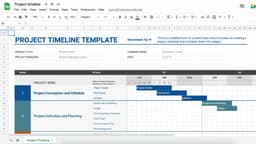
Custom Spreadsheet Design
Create tailored spreadsheets to help businesses run more efficiently.
About Custom Spreadsheet Design
What is Spreadsheet Design?
Custom spreadsheet design means building Excel or Google Sheets solutions that help businesses track data, automate calculations, and make decisions. Most business owners know basic spreadsheets but don't know how to build the systems they actually need.
That's where you come in. You create budgets, inventory trackers, project management tools, dashboards, and automated reports that save businesses hours every week.
Why This Work Exists
Most People Don't Know Spreadsheets
The average person uses maybe 5% of Excel's features. They struggle with:
- Formulas beyond SUM and AVERAGE
- Organizing data properly
- Automating repetitive tasks
- Creating useful visualizations
Businesses Run on Spreadsheets
Before companies can afford fancy software, they use spreadsheets for everything:
- Tracking finances
- Managing inventory
- Scheduling projects
- Analyzing sales
- Reporting to stakeholders
What You Can Build
Common Projects
| Type | Complexity | Typical Price |
|---|---|---|
| Budget tracker | Simple | $75-200 |
| Invoice template | Simple | $50-150 |
| Project tracker | Medium | $200-500 |
| Inventory system | Medium | $300-800 |
| Sales dashboard | Complex | $500-1,500 |
| Automated reports | Complex | $800-2,500 |
Template Products
Sell the same spreadsheet multiple times on Gumroad:
- Personal budgets: $10-30
- Business trackers: $25-75
- Industry-specific tools: $50-200
Skills to Learn
Essential (Learn First)
- VLOOKUP and XLOOKUP
- IF, AND, OR statements
- SUMIFS, COUNTIFS
- Pivot tables
- Data validation
- Conditional formatting
Intermediate
- INDEX/MATCH
- Array formulas
- Charts and dashboards
- Named ranges
- Data cleaning
Advanced
- VBA macros (Excel)
- Google Apps Script
- Power Query
- Dynamic arrays
Where to Learn (Free)
- YouTube tutorials
- ExcelJet.net
- Google's own documentation
- r/excel and r/googlesheets
You can go from beginner to capable freelancer in 2-3 months of consistent learning.
Finding Work
Freelance Platforms
Direct Outreach
Small businesses that need help:
- Real estate agents
- E-commerce stores
- Service businesses
- Nonprofits
- Local retailers
Your Network
- Friends who run businesses
- Former coworkers
- Facebook groups for small business owners
- Local business associations
Pricing Your Work
Hourly vs. Project
| Model | Best For |
|---|---|
| Hourly ($25-60/hr) | Unclear scope, ongoing work |
| Per project | Defined deliverables |
What Affects Price
- How complex is it?
- How much time will it take?
- How valuable is it to them?
- What's your experience level?
Start lower to build experience and testimonials, then raise rates.
Project Process
1. Discovery Call
Understand what they need:
- What problem are they solving?
- What data do they have?
- How will they use it?
- What's their deadline?
2. Quote and Agreement
- Define exactly what you'll deliver
- Set a price and timeline
- Get agreement in writing
3. Build It
- Create the structure
- Add formulas and automation
- Make it user-friendly
- Test everything
4. Deliver and Train
- Walk them through how to use it
- Answer questions
- Make small adjustments
- Get paid
Selling Templates
Why Templates Work
Build once, sell forever:
- Create a polished spreadsheet
- Write simple instructions
- List on Gumroad or Etsy
- Promote on social media
- Earn while you sleep
Popular Template Categories
- Personal finance and budgeting
- Small business expenses
- Project and task management
- Habit and goal tracking
- Fitness and meal planning
Tools You'll Use
- Google Drive for collaboration
- Notion for project notes
- Loom for tutorial videos
- Canva for template graphics
Working While Traveling
Why It Works
- 100% digital work
- No calls required (mostly)
- Flexible deadlines
- Clients everywhere
Tips
- Always use cloud storage
- Test on both Excel and Sheets
- Record video explanations
- Be clear about response times
Who Should Do This?
Good fit if you:
- Like solving problems logically
- Find satisfaction in organization
- Enjoy learning technical skills
- Want flexible remote work
- Don't mind detail-oriented tasks
Not ideal if you:
- Find spreadsheets boring
- Prefer creative work
- Hate debugging problems
- Need constant variety
- Don't like client work
Getting Started
- Learn advanced formulas (2-4 weeks)
- Build 3-5 sample spreadsheets
- Create profiles on Upwork and Fiverr
- Apply to jobs (start with smaller ones)
- Deliver great work, get reviews
- Raise rates as you improve
The Bottom Line
Spreadsheet design is an underrated freelance skill. Businesses constantly need help, the work is fully remote, and you can learn everything for free online.
It's not glamorous, but it pays well and the demand never stops. Every business runs on spreadsheets—and most of them are a mess.
Help them clean it up.
Business Models
Frequently Asked Questions
What spreadsheet skills do I need?
Start with formulas beyond basics: VLOOKUP/XLOOKUP, IF statements, SUMIFS. Then learn pivot tables, data validation, and conditional formatting. Automation (VBA or Apps Script) is advanced but valuable. YouTube has everything you need for free.
How much can I charge?
Simple templates: $50-150. Custom business spreadsheets: $200-800. Complex automated systems: $1,000-3,000+. Hourly rates are typically $25-75 depending on skill level. Templates you sell repeatedly add passive income.
Excel or Google Sheets?
Learn both. Excel is more powerful for complex work. Google Sheets is better for collaboration. Most clients use one or the other, so knowing both doubles your market. Start with whichever you're more comfortable with.
Where do I find clients?
Upwork and Fiverr have lots of spreadsheet jobs. Small businesses on Facebook groups often need help. You can also cold email businesses whose operations clearly run on spreadsheets (real estate, retail, service businesses).
Difficulty Level
Somewhat Difficult 😕
Level of Passivity
Active With Passive Options
How to Monetize
- Paid Per Hour
- Paid Per Project